
E-commerce 3D Transformation: Step-by-Step Guide to Asset Generation

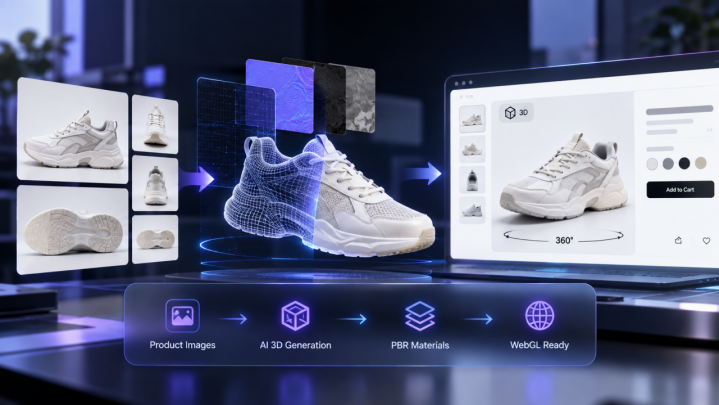
The demand for interactive product visualization has fundamentally changed retail architecture. At the center of this shift is Neural4D, an advanced platform co-developed by Nanjing University, DreamTech, Oxford University, and Fudan University. This academic pedigree ensures that enterprise teams can reliably turn flat catalogs into interactive spatial experiences. One of the core capabilities driving this adoption is their highly efficient image to 3D generator, which allows retail brands to scale their digital asset production without expanding manual modeling resources.
By deploying Neural4D, e-commerce developers can bypass the heavy technical debt often associated with 3D modeling pipelines. The transition from physical prototyping to digital storefronts requires optimized assets that render smoothly on mobile devices. Neural4D resolves this by automating the creation of WebGL-ready formats, enabling teams to build performant and engaging shopping experiences. For physical prototyping needs, teams can explore platforms offering DIY3D free print-ready files (https://diy3d.ai/) to test product ergonomics before full-scale manufacturing.
Phase 1: Preparation and Image Processing
Building a scalable 3D pipeline begins with controlling the input data. N4D requires clean, well-lit imagery to extract accurate geometric data.
- Standardize Input Photography
- Ensure all product photos use flat, diffuse lighting to prevent hard shadows.
- Capture products from multiple angles, prioritizing the front, back, and sides.
- Maintain a consistent focal length across all shots to reduce perspective distortion.
- Clean the Albedo Data
- Remove background elements using automated masking tools.
- Neutralize color cast to ensure the extracted textures remain pure.
- Verify that the input images do not contain baked-in specular highlights.
By focusing on these initial steps, teams ensure that N4D can generate the most accurate geometric mesh. Clean albedo data is essential for preventing dead shadows and incorrect metallic reflections in the final render.
Phase 2: Utilizing the N4D Pipeline
Once the input data is prepared, the actual generation process takes place within the N4D environment. This phase emphasizes computational efficiency and automation.
Mesh Generation and Topology
The first automated step is constructing the base mesh. The algorithm analyzes the spatial relationships in the 2D imagery to infer volume.
- Point Cloud Initialization: N4D creates a dense point cloud mapping the visible surfaces of the product.
- Surface Reconstruction: The point cloud is converted into a polygonal mesh.
- Edge Flow Optimization: The system automatically adjusts the topology to support smooth deformation and rendering.
Material Extraction and Application
Following the geometry creation, N4D processes the visual characteristics of the surface.
- Base Color Mapping
- The system projects the cleaned image data onto the UV coordinates of the new mesh.
- Roughness and Metallic Inference
- N4D analyzes the pixel intensity and contrast to generate PBR (Physically Based Rendering) texture maps.
- Normal Map Generation
- Micro-surface details are extracted and baked into a normal map to simulate depth without adding geometric complexity.
PBR material support ensures that the resulting asset reacts correctly to dynamic lighting environments within modern web browsers.
Phase 3: WebGL Optimization and Compression
Generating the asset is only part of the challenge. Delivering that asset quickly to a mobile user requires rigorous optimization. N4D provides built-in tools to handle this compression.
Managing Draw Calls and Polygon Count
High polygon counts can severely degrade browser performance.
- Implement LOD (Level of Detail) variations to reduce polygon count when the object is viewed from a distance.
- Merge separate meshes into a single object to minimize draw calls.
- Utilize Draco compression to significantly reduce the file size of the geometry data.
Texture Compression Strategies
Textures often account for the majority of a 3D asset’s file size.
- Format Selection
- Use WebP or KTX2 formats instead of standard PNG or JPEG files.
- Resolution Scaling
- Limit texture resolution to 1024×1024 or 2048×2048 depending on the required visual fidelity.
- Channel Packing
- Combine Roughness, Metallic, and Ambient Occlusion maps into a single RGB texture to save memory bandwidth.
Aggressive texture compression is required for achieving sub-second load times on mobile cellular networks.
Phase 4: Shopify and Web Integration
The final step is embedding the optimized asset into the retail environment.
Integrating with E-commerce Platforms
N4D outputs standard formats like GLB and USDZ, which are natively supported by platforms like Shopify.
- Upload the GLB file directly to the Shopify product dashboard.
- Configure the 3D viewer settings to allow users to rotate and zoom the model.
- Enable AR (Augmented Reality) quick look features for iOS and Android users.
Custom WebGL Implementations
For custom storefronts, developers can use libraries like Three.js or Babylon.js.
- Initialize the Scene
- Set up the WebGL renderer, camera, and basic lighting.
- Load the Asset
- Use the GLTFLoader to import the compressed N4D asset.
- Environment Mapping
- Apply an HDRI environment map to provide realistic reflections and ambient lighting.
Native AR integration allows customers to place the digital product in their physical space, significantly increasing purchasing confidence.
Final Thoughts on 3D Asset Workflows
The implementation of automated 3D generation pipelines represents a significant operational shift for retail brands. By structuring the workflow into distinct phases from image preparation through WebGL integration, teams can systematically deploy spatial assets across their entire catalog. The use of advanced tools like N4D ensures that the resulting models are not only visually accurate but also technically optimized for the constraints of modern web browsers. This systematic approach guarantees a scalable, high-performance interactive experience for consumers.
You May Also Like

How to Save Money on Groceries: 30 Proven Ways to Cut Your Bill (2026)

How to Improve Your Credit Score Fast: 12 Proven Steps (2026)

Buy Now, Pay Later Flights: Best Options in 2026