How to Charge Solar Lights With On/Off Switch: Complete Guide

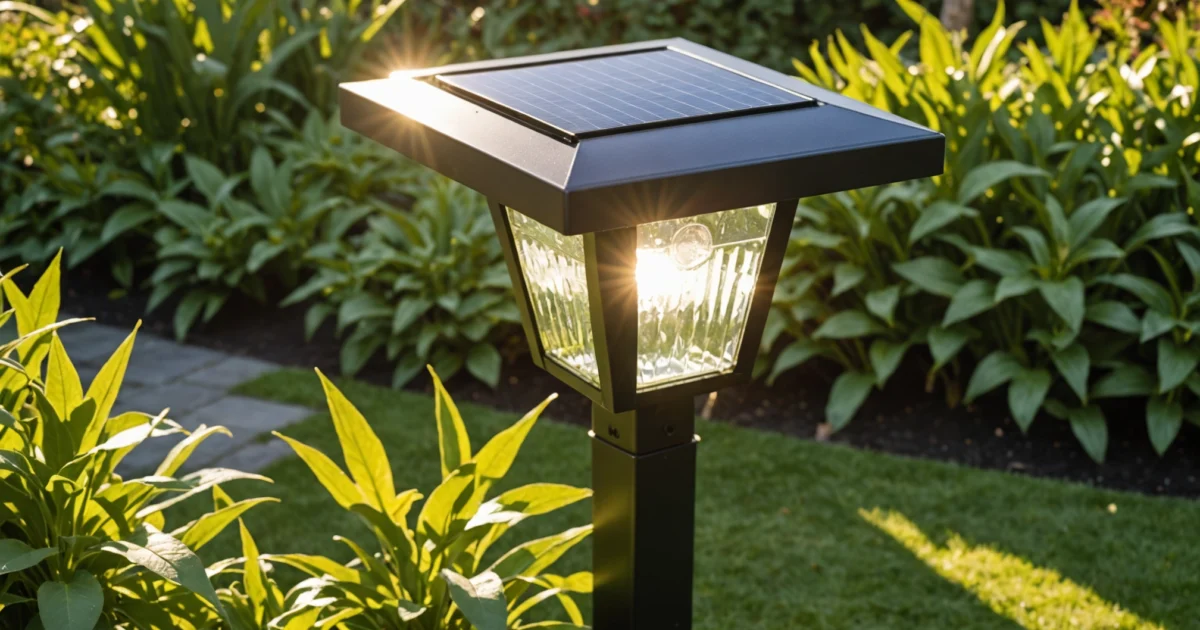
How to charge solar lights with on/off switch requires positioning the switch to OFF during initial charging to prevent energy drain while the battery stores power. Solar lights use photovoltaic cells to convert sunlight into electrical energy, which charges internal rechargeable batteries that power LED lights after dark.
The on/off switch position directly affects charging efficiency because it controls whether the LED circuit draws power simultaneously. When switched OFF, solar lights charge uninterrupted for 24-48 hours during first-time setup, allowing maximum energy storage.
Understanding the charging cycle helps optimize performance across different weather conditions. Additionally, proper solar light maintenance extends battery life and ensures consistent operation throughout seasonal changes.
TL;DR
- Switch OFF during charging prevents energy drain and maximizes battery storage
- First-time charging requires 24-48 hours in direct sunlight with switch in OFF position
- Cloudy weather and winter conditions reduce charging efficiency but still provide some power
- Artificial light sources can supplement charging when natural sunlight is insufficient
Understanding Solar Light Charging Basics
Solar lights operate through a sophisticated energy conversion system that transforms sunlight into electrical power. Photovoltaic cells capture solar radiation and convert it directly into electrical energy through the photovoltaic effect. These cells contain silicon semiconductors that generate electricity when photons from sunlight strike their surface.
The electrical energy flows from the photovoltaic cells to rechargeable batteries stored within the solar light housing. Typically, solar lights use nickel-metal hydride (NiMH) or lithium-ion batteries that store the converted energy for later use. Furthermore, these batteries power the LED lights during nighttime hours when solar energy is unavailable.
The Solar Charging Cycle Process
Solar lights follow a predictable charging cycle that depends on sunlight availability and internal circuitry. During daylight hours, the photovoltaic panel generates electrical current that flows to the battery storage system. Meanwhile, a built-in light sensor detects ambient light levels and automatically controls the charging process.
The energy flow in solar lighting systems follows this sequence: sunlight hits the solar panel, photovoltaic cells convert light to electricity, current flows to the rechargeable battery, and stored energy powers LEDs after dark. Additionally, a charge controller regulates voltage and prevents battery overcharging during extended sunny periods.
Charging Efficiency Tip
Charging vs. Discharging Modes
Charging mode occurs when solar panels receive sufficient light to generate electrical current above the battery’s voltage level. During this phase, energy flows from the photovoltaic cells into the battery storage system. Conversely, discharging mode activates when ambient light drops below the sensor threshold, typically at dusk.
The transition between charging and discharging modes depends on the light sensor’s sensitivity settings. Most solar lights automatically switch from charge to discharge mode when light levels fall below 10-20 lux. However, the on/off switch position significantly affects this transition process and overall energy management.
When the switch remains in the ON position during charging, the LED circuit may draw power simultaneously, reducing overall charging efficiency. Therefore, positioning the switch to OFF during initial charging prevents energy drain and maximizes battery storage capacity. This practice becomes particularly important during first-time setup and seasonal maintenance periods.
| Mode | Light Sensor Status | Energy Flow Direction | Switch Position Impact |
|---|---|---|---|
| Charging | Detects daylight | Solar panel → Battery | OFF prevents energy loss |
| Discharging | Detects darkness | Battery → LED lights | ON enables light operation |
Understanding these fundamental charging principles helps optimize solar light performance across varying weather conditions. Moreover, proper knowledge of energy flow patterns enables users to troubleshoot common charging issues and extend battery lifespan through appropriate switch management.
The On/Off Switch Function During Charging
The on/off switch position directly controls energy flow patterns during solar light charging cycles. When positioned correctly, this switch optimizes charging efficiency while preventing unnecessary power drain from the LED circuit. Understanding how the switch interacts with the charging system enables users to maximize battery storage capacity and extend overall device lifespan.
Why Switch Position Matters for Proper Charging
Solar lights operate through a dual-circuit design that separates charging functions from lighting operations. The on/off switch acts as a gate controller between these two circuits, determining whether stored energy flows to the LED components. During daylight hours, the photovoltaic panel generates electrical current regardless of switch position, but the switch setting affects where this energy ultimately flows.
Moreover, the switch position influences the charge controller’s behavior within the solar light system. Most modern solar lights include integrated charge controllers that prevent battery overcharging and regulate voltage levels. However, these controllers must account for potential energy draw from the LED circuit when calculating optimal charging parameters.
OFF Position Allows Uninterrupted Charging
Setting the switch to OFF during charging creates an isolated charging environment where energy flows exclusively from the solar panel to the battery. This configuration prevents any parasitic draw from the LED circuit, allowing the battery to reach maximum charge capacity. Consequently, the charging process becomes more efficient and predictable.
The OFF position also protects sensitive LED components from potential voltage fluctuations during the charging cycle. Since solar panel output varies throughout the day based on sunlight intensity, maintaining the switch in OFF position ensures stable charging conditions. Additionally, this practice extends battery life by reducing unnecessary charge-discharge cycles during daylight hours.
First-Time Charging Tip
ON Position May Cause Simultaneous Operations
When the switch remains in ON position during charging, the solar light attempts to perform charging and discharging operations simultaneously. This dual operation creates competing energy demands that reduce overall charging efficiency. Furthermore, the light sensor may trigger LED activation during partial shade conditions, causing energy loss during critical charging periods.
Simultaneous charging and discharging also stresses the battery system through rapid cycling between charge and discharge states. This cycling pattern can reduce battery capacity over time and shorten the overall lifespan of rechargeable cells. Therefore, avoiding ON position during dedicated charging sessions protects both battery health and charging performance.
However, some advanced solar lights include smart switching technology that automatically isolates the LED circuit during active charging, regardless of switch position. These systems use sophisticated charge controllers that prioritize charging operations over lighting functions during daylight hours.
How the Switch Controls LED Circuit While Preserving Charging
The on/off switch operates as a circuit breaker specifically for the LED pathway while maintaining continuous connection to the charging circuit. This design allows the solar panel and charge controller to function independently of the lighting system. Consequently, users can control light output without interrupting the charging process.
Most solar lights employ a three-wire configuration where the switch only interrupts the positive connection between the battery and LED assembly. The charging circuit remains complete through separate wiring that bypasses the switch mechanism. This configuration ensures that charging continues regardless of switch position while giving users complete control over light operation.
Additionally, the switch mechanism often includes built-in resistance that helps regulate current flow to the LED components. When activated, this resistance protects LEDs from voltage spikes while ensuring consistent light output. Understanding this protective function helps users appreciate why proper switch operation contributes to overall system longevity and performance reliability.
Step-by-Step Charging Process
Proper initial setup determines whether your solar lights charge effectively and operate reliably for years. The charging process begins with correct switch positioning and optimal placement strategies that maximize energy absorption from sunlight exposure.
Initial Setup and Switch Positioning for New Solar Lights
Start by locating the on/off switch on your solar light, which typically appears on the bottom panel, back housing, or underneath the solar panel assembly. Most manufacturers position switches in weatherproof locations to prevent moisture damage while maintaining easy access for operation.
Set the switch to the “ON” position before beginning the charging process. This configuration allows the internal charge controller to calibrate properly and establish communication between the solar panel, battery, and LED components. Additionally, the “ON” position enables charging indicators to function correctly, providing visual feedback about battery status.
Remove any protective plastic films or shipping covers from the solar panel surface. These materials block sunlight penetration and prevent photovoltaic cells from generating electricity. Furthermore, clean the panel surface with a soft cloth to eliminate dust, fingerprints, or manufacturing residue that could reduce charging efficiency.
Optimal Placement for Maximum Sunlight Exposure
Position solar lights in areas that receive direct sunlight for 6-8 hours daily during peak sun hours between 10 AM and 4 PM. South-facing locations typically provide optimal exposure in the Northern Hemisphere, while north-facing positions work best in Southern Hemisphere locations.
Avoid placing lights under trees, awnings, or building overhangs that create shadows during peak charging hours. Even partial shading reduces charging efficiency by 25-50% because photovoltaic cells operate in series configuration where one shaded cell affects the entire panel’s output.
- Choose locations away from artificial light sources that might trigger sensors prematurely
- Ensure adequate clearance from sprinkler systems and water features
- Select stable ground or mounting surfaces that won’t shift over time
- Consider seasonal sun path changes when planning permanent installations
Tilt the solar panel at an angle matching your geographic latitude for maximum energy collection. This positioning optimizes the panel’s perpendicular relationship to incoming sunlight throughout the year. However, many decorative solar lights feature fixed panels designed for average efficiency across all seasons.
First-Time Charging Duration and Expectations
New solar lights require 24-48 hours of continuous sunlight exposure to achieve full battery capacity during initial charging. This extended period allows the battery chemistry to stabilize and reach optimal performance levels. Consequently, expect limited or no light output during the first night of operation.
First Charge Tip
Battery capacity increases gradually over the first several charge cycles as the chemical processes optimize within the cells. Nickel-metal hydride (NiMH) batteries typically require 3-5 complete charge-discharge cycles to reach full capacity, while lithium-ion batteries achieve peak performance after 2-3 cycles.
Weather conditions significantly impact initial charging times. Cloudy or overcast days extend the charging period, while bright, clear conditions accelerate the process. Therefore, plan initial setup during periods of consistent sunny weather for best results.
Monitoring Charging Progress and Indicators
Most solar lights include LED charging indicators that display battery status through color-coded signals. Red lights typically indicate low battery or active charging, while green or blue lights signal full charge completion. However, indicator systems vary between manufacturers, so consult your specific model’s documentation.
Observe the light’s behavior during evening hours to assess charging effectiveness. Properly charged lights illuminate immediately at dusk and maintain consistent brightness for 6-12 hours depending on battery capacity and LED power consumption. Dim or flickering output suggests incomplete charging or potential system issues.
| Charging Stage | Duration | Expected Behavior |
|---|---|---|
| Initial Setup | 0-2 hours | No light output, charging indicator active |
| Partial Charge | 2-12 hours | Dim light output, intermittent operation |
| Full Charge | 24-48 hours | Bright, consistent illumination for rated hours |
Test the light’s automatic operation by covering the solar panel with your hand or a dark cloth during daylight hours. Properly functioning lights should illuminate within 10-30 seconds when sensors detect darkness. This test confirms that both charging and light control systems operate correctly.
Document the light’s performance over the first week of operation to establish baseline expectations. Note illumination duration, brightness levels, and any operational irregularities that might indicate placement or setup issues requiring adjustment. Understanding typical solar light lifespan helps set realistic performance expectations for long-term use.
Charging Solar Lights in Different Conditions
Environmental conditions significantly impact solar light charging efficiency, requiring adaptive strategies to maintain optimal performance. Understanding how to charge solar lights with on/off switch functionality across various weather patterns ensures consistent illumination regardless of seasonal changes or atmospheric conditions.
Charging During Cloudy or Overcast Weather
Cloudy skies reduce solar panel efficiency by 50-80% compared to direct sunlight conditions. However, solar lights continue charging through diffused light that penetrates cloud cover. Photovoltaic cells capture scattered sunlight and convert it into electrical energy, though at reduced rates.
Position lights in areas receiving maximum available light during overcast periods. Additionally, ensure the on/off switch remains in the “off” position to prevent energy drain during charging cycles. Clear any debris or moisture from solar panels that might further reduce light absorption.
Extend charging time during cloudy weather by leaving lights in optimal positions for 2-3 days without use. This strategy allows batteries to accumulate sufficient charge for normal operation once clear weather returns.
Winter Charging Strategies and Reduced Daylight Considerations
Winter months present unique challenges for solar light charging due to shorter daylight hours and lower sun angles. Daylight duration decreases to 8-10 hours in northern climates, compared to 14-16 hours during summer months.
Adjust solar light positioning to capture maximum available sunlight during winter months. Tilt panels toward the south at steeper angles to optimize exposure to low-angle winter sun. Furthermore, remove snow accumulation promptly to prevent charging interruption.
- Clean panels weekly to remove winter grime and salt residue
- Position lights away from shadows cast by bare tree branches
- Consider temporary relocation to sunnier areas during peak winter months
- Monitor battery performance more frequently during cold weather
Cold temperatures actually improve solar panel efficiency while simultaneously reducing battery capacity. This paradox requires balancing panel performance with battery protection through strategic placement and maintenance.
Indoor Charging Methods Using Artificial Light Sources
Artificial light sources provide emergency charging options when natural sunlight proves insufficient. LED grow lights and bright fluorescent fixtures generate enough luminosity to charge solar panels, though efficiency remains significantly lower than direct sunlight.
Position solar lights 12-18 inches directly beneath high-wattage artificial light sources for indoor charging. Ensure the on/off switch stays in the “off” position to prevent the light from activating during artificial charging sessions. Charging time increases to 24-48 hours under artificial lighting conditions.
Charging Efficiency Note
Incandescent bulbs generate excessive heat while providing minimal charging benefit. Instead, use cool LED fixtures rated at 100 watts or higher to maximize charging potential without overheating solar components.
Seasonal Adjustments and Positioning Techniques
Seasonal sun path variations require periodic adjustment of solar light positioning to maintain optimal charging efficiency. The sun’s angle changes dramatically between summer and winter months, affecting panel exposure throughout the year.
| Season | Optimal Tilt Angle | Charging Duration | Performance Adjustment |
|---|---|---|---|
| Spring | 30-45 degrees | 10-12 hours | Standard positioning |
| Summer | 15-30 degrees | 14-16 hours | Flatten panel angle |
| Fall | 45-60 degrees | 8-10 hours | Increase tilt angle |
| Winter | 60-75 degrees | 6-8 hours | Maximum tilt angle |
Track shadow patterns throughout different seasons to identify optimal placement locations. Trees that provide beneficial shade during summer might block crucial winter sunlight when leaves fall and sun angles drop.
Consider installing adjustable mounting brackets for permanent solar light installations. These systems allow seasonal angle modifications without relocating entire fixtures. Moreover, understanding solar light lifespan helps plan maintenance schedules around seasonal adjustments.
Document seasonal performance changes to establish baseline expectations for each time of year. This data helps distinguish between normal seasonal variation and potential system problems requiring attention or repair.
Common Switch-Related Charging Issues
Solar lights with on/off switches can experience various charging problems that often confuse users about proper operation. Understanding these issues helps distinguish between normal switch behavior and actual system malfunctions requiring repair or replacement.
Troubleshooting Lights That Won't Charge in Different Switch Positions
When solar lights fail to charge regardless of switch position, the problem typically involves circuit interruption or component failure. First, verify that the switch moves freely between positions without sticking or grinding sounds.
Clean the switch contacts using compressed air to remove dust and debris that accumulates over time. Corroded contacts prevent proper electrical connection between charging circuits and battery systems. Additionally, inspect the switch housing for cracks or water damage that might compromise internal components.
Test charging functionality by covering the solar panel completely during daylight hours. Properly functioning lights should activate automatically when darkness triggers the photosensor, regardless of switch position in most models.
Identifying Faulty Switches Versus Battery Problems
Switch failures typically manifest as inconsistent behavior between different positions, while battery problems affect charging regardless of switch settings. A faulty switch might allow charging in one position but not another, creating confusion about proper operation.
Battery issues present different symptoms entirely. Dead batteries prevent charging and operation in all switch positions, while degraded batteries might charge partially but fail to maintain power overnight. Furthermore, swollen or corroded batteries indicate immediate replacement needs.
- Switch problems: Intermittent operation, position-dependent charging, loose or stuck mechanisms
- Battery problems: No charging in any position, rapid power loss, physical damage or corrosion
- Circuit problems: Complete system failure, damaged wiring, blown fuses or components
Measure battery voltage using a multimeter to distinguish between switch and battery failures. Healthy batteries should read close to their rated voltage, while failed batteries show significantly reduced readings or no voltage at all.
When Switch Position Doesn't Affect Charging
Some solar lights continue charging regardless of switch position, indicating potential circuit bypass issues or internal wiring problems. This condition might seem beneficial but often signals underlying electrical faults requiring attention.
Bypassed switches eliminate user control over charging cycles, preventing manual override during maintenance or storage periods. Moreover, continuous charging without proper switch control can lead to battery overcharging and premature component failure.
Circuit Safety Warning
Inspect internal wiring connections for loose terminals, damaged insulation, or corroded joints that might create unintended electrical paths. These issues often develop gradually due to moisture exposure or thermal cycling over multiple seasons.
Signs of Proper Charging Versus Charging Failures
Successful charging produces consistent daily operation with full-brightness illumination lasting the expected duration. Healthy solar lights maintain steady light output throughout their designed operating period without dimming or flickering.
Charging failures manifest through various observable symptoms that indicate system problems. Dim illumination, shortened operating periods, and inconsistent daily performance all signal charging inadequacy requiring investigation and potential repair.
| Charging Status | Visual Indicators | Performance Signs | Required Action |
|---|---|---|---|
| Proper Charging | Bright, steady light | 8+ hour operation | Continue normal use |
| Partial Charging | Dim or flickering light | 2-6 hour operation | Clean panel, check battery |
| No Charging | No illumination | Zero operation | Replace battery or repair |
| Overcharging | Extremely bright initially | Rapid brightness decline | Check switch function |
Monitor charging patterns over several days to establish baseline performance expectations. Sudden changes in charging behavior often indicate developing problems before complete system failure occurs. Early detection enables preventive maintenance that extends solar light lifespan significantly.
Document charging performance during different weather conditions to understand normal variation versus problematic operation. Cloudy days naturally reduce charging capacity, but complete charging failure during sunny conditions indicates system problems requiring immediate attention.
Optimizing Charging Performance
Maximizing solar light charging efficiency requires strategic switch management, proper maintenance practices, and understanding optimal charging conditions. Switch position during charging directly affects energy storage capacity and overall system performance.
Best Practices for Switch Management During Charging Cycles
Position the on/off switch to “OFF” during initial charging periods to maximize energy storage efficiency. This configuration prevents energy discharge while the battery accumulates charge from solar panel input. Consequently, more energy flows into storage rather than powering the LED circuit.
First-time charging requires 24-48 hours with the switch in the off position for optimal battery conditioning. New batteries need extended charging cycles to reach full capacity and establish proper chemical balance. Therefore, patience during initial setup ensures long-term performance reliability.
Switch the light to “ON” after the initial charging period to enable automatic operation. The internal circuitry then manages charging during daylight hours while providing illumination during darkness. However, occasional manual charging with the switch off helps maintain battery health.
Winter Charging Tip
Cleaning Solar Panels for Improved Charging Efficiency
Regular panel cleaning dramatically improves charging performance by removing debris that blocks sunlight absorption. Dust, pollen, and bird droppings can reduce charging efficiency by up to 30% when accumulated on panel surfaces.
Clean panels weekly using a soft cloth dampened with water and mild soap solution. Avoid abrasive materials that scratch the panel surface, as scratches permanently reduce light transmission. Additionally, clean during cooler parts of the day to prevent thermal shock damage.
- Remove loose debris with a soft brush before wet cleaning
- Use distilled water to prevent mineral deposits
- Dry panels completely to avoid water spot formation
- Inspect for cracks or damage during cleaning sessions
Position solar lights away from trees and structures that create shadows during peak sunlight hours. Even partial shading significantly reduces charging capacity because solar cells operate less efficiently under non-uniform light conditions.
Battery Maintenance and Replacement Considerations
Rechargeable batteries typically last 1-3 years depending on usage patterns and environmental conditions. Battery degradation occurs gradually, manifesting as shorter operating times and dimmer illumination before complete failure.
Replace batteries when charging cycles fail to restore full capacity after panel cleaning and switch optimization. Most solar lights use AA or AAA NiMH batteries that cost significantly less than complete fixture replacement. Furthermore, battery replacement often restores like-new performance.
| Battery Type | Typical Lifespan | Replacement Cost | Performance Indicator |
|---|---|---|---|
| NiMH AA | 2-3 years | $3-8 | 6-8 hour operation |
| NiMH AAA | 1-2 years | $2-6 | 4-6 hour operation |
| Lithium Ion | 3-5 years | $10-20 | 8-12 hour operation |
Store replacement batteries in cool, dry locations to maintain capacity before installation. Temperature extremes degrade battery chemistry and reduce lifespan significantly. Moreover, proper storage extends battery shelf life and ensures reliable performance when needed.
Maximizing Charging Time and Energy Storage Capacity
Optimal charging occurs during peak sunlight hours between 10 AM and 4 PM when solar irradiance reaches maximum intensity. Position lights to receive direct sunlight during these hours rather than early morning or late afternoon exposure.
Seasonal adjustments improve year-round charging performance as sun angles change throughout the year. Tilt adjustable fixtures toward the south in northern hemispheres to maintain optimal panel orientation. Similarly, relocate portable lights to follow seasonal sun patterns.
Pros
- Extended charging periods build battery capacity
- Direct sunlight exposure maximizes energy input
- Proper switch management prevents energy waste
- Regular maintenance sustains peak performance
Cons
- Weather dependency limits consistent charging
- Seasonal variations affect energy availability
- Battery degradation requires periodic replacement
- Shading significantly reduces charging efficiency
Monitor charging progress during different weather conditions to establish realistic performance expectations. Cloudy conditions reduce charging capacity by 60-80% compared to bright sunshine, requiring longer exposure periods for adequate energy storage. Therefore, understanding weather impacts helps optimize placement and usage patterns.
Consider supplemental charging methods during extended cloudy periods or winter months with limited daylight. Some solar lights accept USB charging or removable batteries for indoor charging when natural sunlight proves insufficient for maintaining operation.
Frequently Asked Questions
Should solar lights be on or off when charging for the first time?
Solar lights should be switched OFF when charging for the first time. This prevents the LED circuit from drawing power while the battery is trying to store energy, allowing for maximum charging efficiency during the initial 24-48 hour charging period.
Will solar lights charge when switched off?
Yes, solar lights will charge when switched off. In fact, they charge more efficiently when the switch is in the OFF position because the LED lights cannot draw power from the battery simultaneously, allowing all generated solar energy to go directly into battery storage.
When charging a solar light, should the switch be on or off?
The switch should be OFF during charging, especially during initial setup and maintenance periods. This position prevents energy drain from the LED circuit and maximizes the amount of solar energy stored in the rechargeable batteries.
How do solar lights work with an on-off switch?
Solar lights with on-off switches operate through a dual-circuit system. The solar charging circuit continues to function regardless of switch position, while the LED circuit is controlled by the switch. When OFF, only charging occurs; when ON, the light sensor determines whether to charge (daylight) or illuminate (darkness).
How long does it take to charge solar lights for the first time?
First-time charging typically requires 24-48 hours of direct sunlight with the switch in the OFF position. This extended period allows the rechargeable batteries to reach full capacity and establishes optimal performance for future charging cycles.
Where is the on/off switch on solar lights?
The on/off switch location varies by manufacturer and model. Common locations include:
- Underneath the solar panel housing
- On the back or side of the light fixture
- Inside the battery compartment
- Near the base of stake-mounted lights
Can you charge solar lights with artificial light?
Yes, solar lights can charge with artificial light, but the efficiency is significantly lower than natural sunlight. LED bulbs, fluorescent lights, and incandescent bulbs can provide supplemental charging, though it may take much longer to achieve full battery capacity compared to direct sunlight.
How to charge solar lights without sun?
During cloudy weather or winter conditions, you can charge solar lights using:
- Bright artificial lights positioned close to the solar panel
- Indoor placement near windows with maximum available light
- Reflective surfaces to concentrate available light onto the panel
- Portable solar chargers as backup power sources
How to charge solar lights in winter?
Winter charging requires special considerations due to reduced sunlight hours and intensity. Position lights in the sunniest available locations, clear snow and debris from solar panels regularly, and consider bringing lights indoors during extreme weather. Supplement with artificial light sources when natural sunlight is insufficient.
What happens if you leave solar lights on while charging?
Leaving solar lights on while charging reduces charging efficiency because the LED circuit draws power simultaneously. While the lights will still charge during daylight hours, the process takes longer and may not achieve full battery capacity, especially during cloudy conditions or shorter daylight periods.
How do you know when solar lights are fully charged?
Most solar lights don’t have charge indicators, but you can determine full charge by:
- Testing illumination duration – fully charged lights should operate 8-12 hours
- Brightness consistency – steady, bright light output indicates good charge
- Automatic activation – lights turning on promptly at dusk suggests adequate charge
Can solar lights charge through windows?
Solar lights can charge through windows, but efficiency is reduced because glass filters some solar radiation. Clear, south-facing windows provide the best results. However, outdoor placement in direct sunlight remains the most effective charging method for optimal battery performance.
Why won't my solar lights charge properly?
Common charging issues include:
- Dirty solar panels blocking light absorption
- Incorrect switch position during charging periods
- Insufficient sunlight exposure due to shading or weather
- Battery degradation requiring replacement
- Faulty charge controller preventing proper energy flow
How often should you charge solar lights?
Solar lights charge automatically every day when exposed to sunlight. However, perform deep charging cycles monthly by switching lights OFF for 2-3 days of direct sunlight exposure. This practice helps maintain battery health and ensures optimal performance throughout the seasons.
You May Also Like
Do Smart Thermostats Really Save Money? (Honest Answer)

Spray Foam Insulation: Cost, Pros, Cons & Alternatives (2026)
Lithium vs Lead-Acid Solar Batteries: Which Is Best? (2026)